-

![]()
SMART: Estimated Life Remaining Is Lower Than 100%
https://www.solidigm.com/support-page/maintenance-tools/ka-00058.htmlExplanation Of Estimated Life Remaining
Tags: -
![]()
Solidigm Storage Tool™
https://www.solidigm.com/support-page/drivers-downloads/ka-00085.htmlThe Solidigm Storage Tool™ Assists With The Management Of Solidigm SSDs
-
![]()
Unable To Install Solidigm™ Storage Tool (SST)
https://www.solidigm.com/support-page/installation-compatibility/ka-01676.htmlWorkarounds To Prevent An Installation Error With The Solidigm™ Memory And Storage Tool
-
![]()
What Is The Meaning Of "Drive Health" And "Estimated Life Remaining" In The Solidigm Storage Tool™?
https://www.solidigm.com/support-page/trouble-error-msgs/ka-00074.htmlHow These Values Are Calculated By The Solidigm Storage Tool™
-
![]()
View And Change Solidigm Storage Tool™ Configuration Settings
https://www.solidigm.com/support-page/maintenance-tools/ka-01736.htmlSee And Change SST Configuration
-
![]()
"Bootable" Solidigm Storage Tool™
https://www.solidigm.com/support-page/maintenance-tools/ka-01839.htmlAbility To Use SST Outside A Boot Drive Or Single Drive System
-
![]()
Retrieve Solidigm™ Solid State Drives Binary Logs With Storage Tool
https://www.solidigm.com/support-page/trouble-error-msgs/ka-00064.htmlHow To Pull Various Logs From Solidigm SSDs For Debugging
-
![]()
How Much Has My Solidigm™ Solid State Drive Degraded?
https://www.solidigm.com/support-page/maintenance-tools/ka-01469.htmlDetermine How Much A Solidigm SSD Has Degraded Using The Solidigm Storage Tool™
-
![]()
How To Fix Read Scan Errors During A Solid State Drive Diagnostic Scan
https://www.solidigm.com/support-page/trouble-error-msgs/ka-00059.htmlTroubleshooting Tips To Fix Read Scan Errors During A Full Or Quick Diagnostic Scan With The Solidigm Storage Tool™
-
![]()
Locate Current And Update Solidigm™ SSD Firmware Using Solidigm Tools
https://www.solidigm.com/support-page/maintenance-tools/ka-00052.htmlVerify Current And Newer Firmware And Perform Updates
-
![]()
How To Optimize A Solidigm™ Solid State Drive
https://www.solidigm.com/support-page/maintenance-tools/ka-00016.htmlOptimize Your SSD's Performance
-
![]()
How To Revert Opal* Encryption In A Solidigm™ Solid State Drive
https://www.solidigm.com/support-page/trouble-error-msgs/ka-00062.htmlSteps To Revert The Encryption Of an Opal*-Activated Device
-
![]()
How To Recover The Solid State Drive If CRC (Cyclic Redundancy Check) Errors Are Detected
https://www.solidigm.com/support-page/trouble-error-msgs/ka-00060.htmlTroubleshooting Tips To Recover The SSD If Cyclic Redundancy Check (CRC) Errors Are Detected
-
![]()
How To Initialize Your Solidigm™ SSD With Windows* Disk Management Tool
https://www.solidigm.com/support-page/installation-compatibility/ka-00022.htmlBring A Brand-New Or Erased Solidigm SSD To Usability For Windows
-
![]()
How To Set The SATA Solidigm™ Data Center SSD In SATA 600 Interface
https://www.solidigm.com/support-page/performance/ka-00069.htmlSteps To Set The SATA Solidigm™ Data Center SSD In SATA 300 And 600
-
![]()
SSD Exhibits Slower Than Expected Read/Write Performance
https://www.solidigm.com/support-page/performance/ka-00076.htmlFactors To Check When Reviewing Performance on Solid State Drives
-
![]()
View And Retrieve SMART Data Using Solidigm™ Tools
https://www.solidigm.com/support-page/maintenance-tools/ka-01655.htmlSteps To Review And Export SMART Attributes
-
Anatomy of a Prompt
https://www.solidigm.com/products/technology/anatomy-of-prompt-structure-for-llm-kv-cache.htmlDiscover how prompt structure systematically generates state objects that influence storage architecture and the quality-of-service requirements for LLM inference and RAG.
Tags: -
![]()
Secure Erase SSDs with Solidigm™ Tools
https://www.solidigm.com/support-page/maintenance-tools/ka-00011.htmlPerform a Secure Erase SSDs
-
![]()
Does The Solidigm™ NVMe* SSD Generate Heat?
https://www.solidigm.com/support-page/product-doc-cert/ka-00071.htmlExplains If The Drive Generates Heat And How Much It Supports
-
![]()
Clear The Cache Of Solidigm™ QLC SSDs
https://www.solidigm.com/support-page/maintenance-tools/ka-00057.htmlWhy And How To Clear The Cache Of A Solidigm QLC SSD
-
![]()
Troubleshooting and Health Monitoring Guide for Solidigm™ Data Center Drives
https://www.solidigm.com/support-page/maintenance-tools/ka-01879.htmlA Downloadable Guide for Working with Enterprise SSDs with Various Tools
-
![]()
Troubleshooting Steps To Resolve BSOD Errors When Booting From A Solidigm™ SSD
https://www.solidigm.com/support-page/trouble-error-msgs/ka-00019.htmlSystem Unable To Boot To The OS After Blue Screen Error Code
-
![]()
SMART Attributes AA And E8
https://www.solidigm.com/support-page/trouble-error-msgs/ka-00097.htmlLearn About The AA And E8 Attributes.
-
![]()
How To Check And Repair Your System Disk Drives For Integrity Issues
https://www.solidigm.com/support-page/maintenance-tools/ka-00045.htmlUse Tools Like Windows* Deployment Image Servicing Manager And Windows* Error Checking To Scan The Disk Drive For Integrity Issues And Attempt Repair
-
Solidigm QLC SSDs are Ready for Mainstream
https://www.solidigm.com/products/campaign/qlc-ssds.htmlDiscover how Solidigm QLC SSDs provide the right performance at a lower Total Cost of Ownership (TCO) for mainstream and read-intensive workloads.
-
![]()
Solidigm Synergy™ Software And Driver For Client Solid State Drives
https://www.solidigm.com/support-page/drivers-downloads/ka-01737.htmlAll-In-One Performance Booster And Drive Manager
-
Solidigm™ D7-P5520 and D7-P5620 Product Brief
https://www.solidigm.com/products/data-center/product-briefs/d7-p5520-p5620-product-brief.htmlDiscover the Solidigm D7-P5520 and P5620 Product Brief to see how this TLC SSD can meet your enterprise, data center, and cloud storage needs.
-
![]()
My Solidigm™ Solid State Drive Cannot Be Accessed And The File System Shows RAW Under Disk Management
https://www.solidigm.com/support-page/trouble-error-msgs/ka-00061.htmlSteps To Resolve Solidigm SSD Issue With Access And File System
-
![]()
Solidigm™ D7-PS1010 & D7-PS1030 Product Brief
https://www.solidigm.com/products/data-center/product-briefs/solidigm-d7-ps1010-ps1030-product-brief.htmlLearn how the new Solidigm D7-PS1010 and D7-PS1030 SSDs are built to accelerate demanding mainstream workloads and power your AI data pipeline.
Tags: -
![]()
Latest Firmware For Solidigm™ Solid State Drives
https://www.solidigm.com/support-page/product-doc-cert/ka-00099.htmlMost Recent Firmware Released Per Product
-
DUG Unlocks Faster RNA Sequencing with VAST Data Platform & Solidigm Storage
https://www.solidigm.com/products/technology/faster-rna-sequencing-with-dug-vast-data-solidigm.htmlLearn how VAST Data, DUG, and Solidigm are helping solve challenges around using data for RNA sequencing, which places immense stress on storage and computing infrastructure.
-
Three Actionable Ways to Improve Your Cloud Storage CloudFest 2023 Keynote Address
https://www.solidigm.com/products/technology/cloudfest-keynote-video-alexey-rogachkov-improve-cloud-storage.htmlView the video on 3 actionable ways to improve your cloud storage in this keynote address from CloudFest 2023 presented by Alexey Rogachkov of Solidigm.
-
Solidigm™ D5 P5430 Product Brief Mainstream Read Intensive Workloads
https://www.solidigm.com/products/data-center/product-briefs/solidigm-d5-p5430-product-brief.htmlData is growing at a rapid pace, testing the limits of data centers and storage scalability. Modern, data-intensive workloads and use cases such as AI, ML, content-delivery networks (CDNs), object-based storage, and data analytics require massive amounts of data to be stored efficiently and accessed at speed.
-
![]()
Recommendations To Try When The Solidigm™ Solid State Drive Shows 0 B Of Space
https://www.solidigm.com/support-page/trouble-error-msgs/ka-00039.htmlRecommendations To Try When The Solidigm Solid State Drive (SSD) Shows 0 B Of Space
-
![]()
How To Reference A Single SSD Using Solidigm™ CLI Tools
https://www.solidigm.com/support-page/maintenance-tools/ka-00078.htmlHow To Reference A Specific Solid State Drive For Command-Line Interfaces Version of Solidigm™ Tools
-
Top 5 Benefits of Solidigm D5-Series SSDs for Edge Storage Solutions
https://www.solidigm.com/products/technology/benefits-of-solidigm-d5-series-for-edge-storage-solutions.htmlLearn how the Solidigm D5 Series SSDs are delivering the best performance and value for edge storage needs.
-
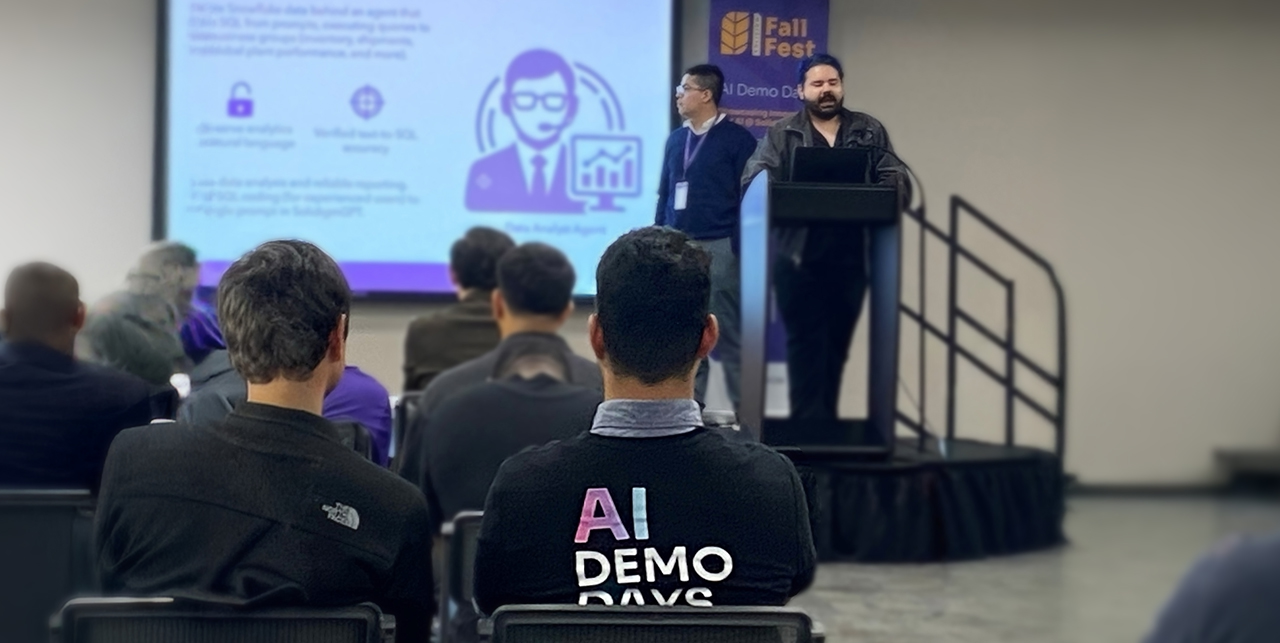
The Solidigm Dual Approach to AI: Powering SSD Innovation and Internal Excellence
https://www.solidigm.com/products/technology/solidigm-ai-innovation-internal-excellence.htmlSee how Solidigm team members are developing AI solutions for real-world situations, from powering SSD innovation to streamlining daily task for internal excellence.
Tags: -
Understanding the Benefits of Extreme Storage Density
https://www.solidigm.com/products/technology/benefits-of-extreme-storage-density.htmlGenerative AI demands more data storage than ever. Learn how the extreme storage density of Solidigm SSDs help provide AI solutions.
-
The Capacity You Need with Performance that is Just Right
https://www.solidigm.com/products/technology/read-dominant-workload-qlc-for-cloud-enterprise-storage.htmlQLC SSDs are right-sized for read dominant workloads in cloud and enterprise storage. Learn how they meet the challenge for performance, density, and TCO.
-
Accelerating AI With High Performance Storage
https://www.solidigm.com/products/technology/accelerating-ai-with-high-performance-storage.htmlDiscover how to eliminate CPU bottlenecks, maintain GPU workload efficiency, and leverage architecture unlocks scalable, cost-efficient AI infrastructure without compromising acceleration.
-
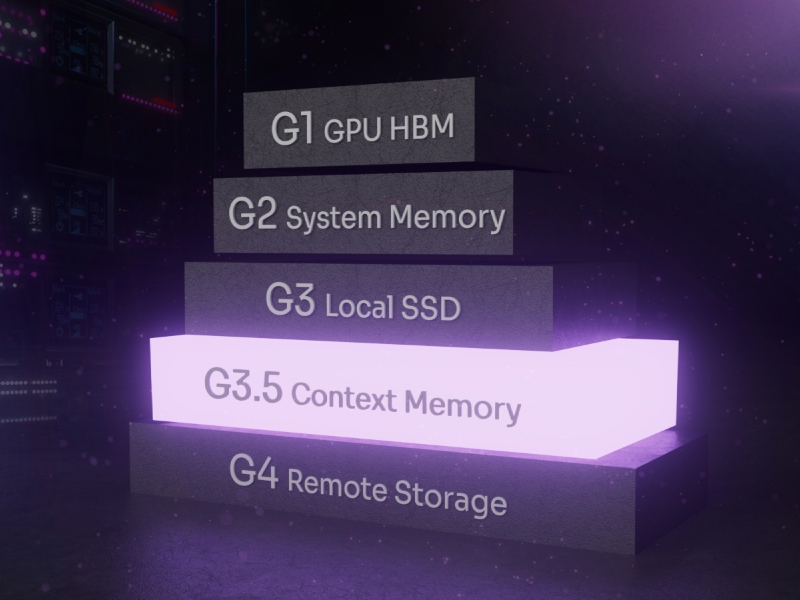
Understanding CMX (Context Memory eXtension) in Data Storage for AI
https://www.solidigm.com/products/technology/what-is-cmx-context-memory-storage.htmlLearn what NVIDIA CMX (Context Memory Storage) is, how it works, and how it’s improving AI workloads by working as a pod-level context tier for storage.
-
![]()
Solidigm™ SSDs: Important SMART Attribute Indicators
https://www.solidigm.com/support-page/product-doc-cert/ka-00033.htmlInformation On How To Determine The Health Of Solidigm SSDs Using A Subset Of Important SMART Or Similar Attributes
-
![]()
How To Test Performance Of The Solidigm™ Client SSD Series
https://www.solidigm.com/support-page/performance/ka-00080.htmlDescribes Methods To Test Performance
-
Understanding Workload and Solutions For PCIe Gen 4 SSDs
https://www.solidigm.com/products/technology/understanding-workload-and-solutions-for-pcie-gen-4-ssds.htmlThe right PCIe Gen 4 SSD balances data growth, increased user expectations, and budgetary challenges. Learn how to choose the right one for your use case.
-
Solidigm™ D5-P5336 Product Brief
https://www.solidigm.com/products/data-center/product-briefs/d5-p5336-product-brief.htmlThe Solidigm D5-P5336 lets you store and accelerate access to massive amounts of data, no matter where it lives.
-
![]()
Guidance When The Solid State Drive Reports An Error With The SMART Attribute B8h
https://www.solidigm.com/support-page/trouble-error-msgs/ka-00014.htmlThe Solid State Drive Shows An Error With The SMART Attribute B8h
-
Platform optimization for performance and endurance
https://www.solidigm.com/products/technology/platform-optimization-for-performance-and-endurance-qlc-csal.htmlSee how Solidigm QLC SSDs and the Wiwynn platform with CSAL can optimize performance and endurance for cloud IT infrastructure
Tags: -
Why Storage Matters for AI
https://www.solidigm.com/products/technology/why-storage-matters-for-ai-video-transcript.htmlLearn how AI data pipelines benefit from SSD storage solutions in this AI Field Day discussion from Solidigm.
-
![]()
-
Optimizing AI Workloads With Solidigm™ Solid-State Drives
https://www.solidigm.com/products/technology/mlperf-ai-workloads-with-solidigm-ssds.htmlSee a detailed overview of Solidigm SSDs using MLPerf benchmark suites on two server platforms for performance insights on AI workloads.
Tags: -
![]()
Retrieve Binary Logs With NVMe*-CLI
https://www.solidigm.com/support-page/trouble-error-msgs/ka-01467.htmlCommands To Retrieve Debugging Information Using NVMe-CLI
-
Performance of Solidigm™ SSDs with BaM and GIDS
https://www.solidigm.com/products/technology/performance-of-solidigm-ssds-with-bam-and-gids.htmlSolidigm engineers are combatting data bottlenecks in the data center using BaM and GIDS to maximize GPU usage and cut training times.
-
Unlocking AI Scale With SSD Offload Techniques
https://www.solidigm.com/products/technology/scale-ai-with-ssd-offload.htmlLearn how retrieval-augmented generation (RAG) can solve enterprise business problems with SSD offloading from Solidigm and Metrum AI.
-
P44 Pro Series – Exceptional Performance
https://www.solidigm.com/products/technology/p44-pro-series-exceptional-performance-ssd-brand-comparison.htmlLearn how the ultra-fast and power-efficient Solidigm P44 Pro SSD delivers performance for the most demanding PC use cases, including gaming, content creation, and data crunching.










-
Solidigm QLC SSDs are Ready for Mainstream
https://www.solidigm.com/products/campaign/qlc-ssds.htmlDiscover how Solidigm QLC SSDs provide the right performance at a lower Total Cost of Ownership (TCO) for mainstream and read-intensive workloads.
-
![]()
SMART: Estimated Life Remaining Is Lower Than 100%
https://www.solidigm.com/support-page/maintenance-tools/ka-00058.htmlExplanation Of Estimated Life Remaining
Tags: -
![]()
Solidigm Storage Tool™
https://www.solidigm.com/support-page/drivers-downloads/ka-00085.htmlThe Solidigm Storage Tool™ Assists With The Management Of Solidigm SSDs
-
![]()
Unable To Install Solidigm™ Storage Tool (SST)
https://www.solidigm.com/support-page/installation-compatibility/ka-01676.htmlWorkarounds To Prevent An Installation Error With The Solidigm™ Memory And Storage Tool
-
![]()
What Is The Meaning Of "Drive Health" And "Estimated Life Remaining" In The Solidigm Storage Tool™?
https://www.solidigm.com/support-page/trouble-error-msgs/ka-00074.htmlHow These Values Are Calculated By The Solidigm Storage Tool™
-
![]()
View And Change Solidigm Storage Tool™ Configuration Settings
https://www.solidigm.com/support-page/maintenance-tools/ka-01736.htmlSee And Change SST Configuration
-
![]()
"Bootable" Solidigm Storage Tool™
https://www.solidigm.com/support-page/maintenance-tools/ka-01839.htmlAbility To Use SST Outside A Boot Drive Or Single Drive System
-
![]()
Retrieve Solidigm™ Solid State Drives Binary Logs With Storage Tool
https://www.solidigm.com/support-page/trouble-error-msgs/ka-00064.htmlHow To Pull Various Logs From Solidigm SSDs For Debugging
-
![]()
How Much Has My Solidigm™ Solid State Drive Degraded?
https://www.solidigm.com/support-page/maintenance-tools/ka-01469.htmlDetermine How Much A Solidigm SSD Has Degraded Using The Solidigm Storage Tool™
-
![]()
How To Fix Read Scan Errors During A Solid State Drive Diagnostic Scan
https://www.solidigm.com/support-page/trouble-error-msgs/ka-00059.htmlTroubleshooting Tips To Fix Read Scan Errors During A Full Or Quick Diagnostic Scan With The Solidigm Storage Tool™
-
![]()
Locate Current And Update Solidigm™ SSD Firmware Using Solidigm Tools
https://www.solidigm.com/support-page/maintenance-tools/ka-00052.htmlVerify Current And Newer Firmware And Perform Updates
-
![]()
How To Optimize A Solidigm™ Solid State Drive
https://www.solidigm.com/support-page/maintenance-tools/ka-00016.htmlOptimize Your SSD's Performance
-
![]()
How To Revert Opal* Encryption In A Solidigm™ Solid State Drive
https://www.solidigm.com/support-page/trouble-error-msgs/ka-00062.htmlSteps To Revert The Encryption Of an Opal*-Activated Device
-
![]()
How To Recover The Solid State Drive If CRC (Cyclic Redundancy Check) Errors Are Detected
https://www.solidigm.com/support-page/trouble-error-msgs/ka-00060.htmlTroubleshooting Tips To Recover The SSD If Cyclic Redundancy Check (CRC) Errors Are Detected
-
![]()
How To Initialize Your Solidigm™ SSD With Windows* Disk Management Tool
https://www.solidigm.com/support-page/installation-compatibility/ka-00022.htmlBring A Brand-New Or Erased Solidigm SSD To Usability For Windows
-
![]()
How To Set The SATA Solidigm™ Data Center SSD In SATA 600 Interface
https://www.solidigm.com/support-page/performance/ka-00069.htmlSteps To Set The SATA Solidigm™ Data Center SSD In SATA 300 And 600
-
![]()
SSD Exhibits Slower Than Expected Read/Write Performance
https://www.solidigm.com/support-page/performance/ka-00076.htmlFactors To Check When Reviewing Performance on Solid State Drives
-
![]()
View And Retrieve SMART Data Using Solidigm™ Tools
https://www.solidigm.com/support-page/maintenance-tools/ka-01655.htmlSteps To Review And Export SMART Attributes
-
![]()
Secure Erase SSDs with Solidigm™ Tools
https://www.solidigm.com/support-page/maintenance-tools/ka-00011.htmlPerform a Secure Erase SSDs
-
![]()
Does The Solidigm™ NVMe* SSD Generate Heat?
https://www.solidigm.com/support-page/product-doc-cert/ka-00071.htmlExplains If The Drive Generates Heat And How Much It Supports
-
![]()
Clear The Cache Of Solidigm™ QLC SSDs
https://www.solidigm.com/support-page/maintenance-tools/ka-00057.htmlWhy And How To Clear The Cache Of A Solidigm QLC SSD
-
![]()
Troubleshooting and Health Monitoring Guide for Solidigm™ Data Center Drives
https://www.solidigm.com/support-page/maintenance-tools/ka-01879.htmlA Downloadable Guide for Working with Enterprise SSDs with Various Tools
-
![]()
Troubleshooting Steps To Resolve BSOD Errors When Booting From A Solidigm™ SSD
https://www.solidigm.com/support-page/trouble-error-msgs/ka-00019.htmlSystem Unable To Boot To The OS After Blue Screen Error Code
-
![]()
SMART Attributes AA And E8
https://www.solidigm.com/support-page/trouble-error-msgs/ka-00097.htmlLearn About The AA And E8 Attributes.
-
![]()
How To Check And Repair Your System Disk Drives For Integrity Issues
https://www.solidigm.com/support-page/maintenance-tools/ka-00045.htmlUse Tools Like Windows* Deployment Image Servicing Manager And Windows* Error Checking To Scan The Disk Drive For Integrity Issues And Attempt Repair
-
![]()
Solidigm Synergy™ Software And Driver For Client Solid State Drives
https://www.solidigm.com/support-page/drivers-downloads/ka-01737.htmlAll-In-One Performance Booster And Drive Manager
-
![]()
My Solidigm™ Solid State Drive Cannot Be Accessed And The File System Shows RAW Under Disk Management
https://www.solidigm.com/support-page/trouble-error-msgs/ka-00061.htmlSteps To Resolve Solidigm SSD Issue With Access And File System
-
![]()
Latest Firmware For Solidigm™ Solid State Drives
https://www.solidigm.com/support-page/product-doc-cert/ka-00099.htmlMost Recent Firmware Released Per Product
-
![]()
Recommendations To Try When The Solidigm™ Solid State Drive Shows 0 B Of Space
https://www.solidigm.com/support-page/trouble-error-msgs/ka-00039.htmlRecommendations To Try When The Solidigm Solid State Drive (SSD) Shows 0 B Of Space
-
![]()
How To Reference A Single SSD Using Solidigm™ CLI Tools
https://www.solidigm.com/support-page/maintenance-tools/ka-00078.htmlHow To Reference A Specific Solid State Drive For Command-Line Interfaces Version of Solidigm™ Tools
-
![]()
Solidigm™ SSDs: Important SMART Attribute Indicators
https://www.solidigm.com/support-page/product-doc-cert/ka-00033.htmlInformation On How To Determine The Health Of Solidigm SSDs Using A Subset Of Important SMART Or Similar Attributes
-
![]()
How To Test Performance Of The Solidigm™ Client SSD Series
https://www.solidigm.com/support-page/performance/ka-00080.htmlDescribes Methods To Test Performance
-
![]()
Guidance When The Solid State Drive Reports An Error With The SMART Attribute B8h
https://www.solidigm.com/support-page/trouble-error-msgs/ka-00014.htmlThe Solid State Drive Shows An Error With The SMART Attribute B8h
-
![]()
Retrieve Binary Logs With NVMe*-CLI
https://www.solidigm.com/support-page/trouble-error-msgs/ka-01467.htmlCommands To Retrieve Debugging Information Using NVMe-CLI
-
Anatomy of a Prompt
https://www.solidigm.com/products/technology/anatomy-of-prompt-structure-for-llm-kv-cache.htmlDiscover how prompt structure systematically generates state objects that influence storage architecture and the quality-of-service requirements for LLM inference and RAG.
Tags: -
DUG Unlocks Faster RNA Sequencing with VAST Data Platform & Solidigm Storage
https://www.solidigm.com/products/technology/faster-rna-sequencing-with-dug-vast-data-solidigm.htmlLearn how VAST Data, DUG, and Solidigm are helping solve challenges around using data for RNA sequencing, which places immense stress on storage and computing infrastructure.
-
Three Actionable Ways to Improve Your Cloud Storage CloudFest 2023 Keynote Address
https://www.solidigm.com/products/technology/cloudfest-keynote-video-alexey-rogachkov-improve-cloud-storage.htmlView the video on 3 actionable ways to improve your cloud storage in this keynote address from CloudFest 2023 presented by Alexey Rogachkov of Solidigm.
-
Top 5 Benefits of Solidigm D5-Series SSDs for Edge Storage Solutions
https://www.solidigm.com/products/technology/benefits-of-solidigm-d5-series-for-edge-storage-solutions.htmlLearn how the Solidigm D5 Series SSDs are delivering the best performance and value for edge storage needs.
-
The Solidigm Dual Approach to AI: Powering SSD Innovation and Internal Excellence
https://www.solidigm.com/products/technology/solidigm-ai-innovation-internal-excellence.htmlSee how Solidigm team members are developing AI solutions for real-world situations, from powering SSD innovation to streamlining daily task for internal excellence.
Tags: -
Understanding the Benefits of Extreme Storage Density
https://www.solidigm.com/products/technology/benefits-of-extreme-storage-density.htmlGenerative AI demands more data storage than ever. Learn how the extreme storage density of Solidigm SSDs help provide AI solutions.
-
The Capacity You Need with Performance that is Just Right
https://www.solidigm.com/products/technology/read-dominant-workload-qlc-for-cloud-enterprise-storage.htmlQLC SSDs are right-sized for read dominant workloads in cloud and enterprise storage. Learn how they meet the challenge for performance, density, and TCO.
-
Accelerating AI With High Performance Storage
https://www.solidigm.com/products/technology/accelerating-ai-with-high-performance-storage.htmlDiscover how to eliminate CPU bottlenecks, maintain GPU workload efficiency, and leverage architecture unlocks scalable, cost-efficient AI infrastructure without compromising acceleration.
-
Understanding CMX (Context Memory eXtension) in Data Storage for AI
https://www.solidigm.com/products/technology/what-is-cmx-context-memory-storage.htmlLearn what NVIDIA CMX (Context Memory Storage) is, how it works, and how it’s improving AI workloads by working as a pod-level context tier for storage.
-
Understanding Workload and Solutions For PCIe Gen 4 SSDs
https://www.solidigm.com/products/technology/understanding-workload-and-solutions-for-pcie-gen-4-ssds.htmlThe right PCIe Gen 4 SSD balances data growth, increased user expectations, and budgetary challenges. Learn how to choose the right one for your use case.
-
Platform optimization for performance and endurance
https://www.solidigm.com/products/technology/platform-optimization-for-performance-and-endurance-qlc-csal.htmlSee how Solidigm QLC SSDs and the Wiwynn platform with CSAL can optimize performance and endurance for cloud IT infrastructure
Tags: -
Why Storage Matters for AI
https://www.solidigm.com/products/technology/why-storage-matters-for-ai-video-transcript.htmlLearn how AI data pipelines benefit from SSD storage solutions in this AI Field Day discussion from Solidigm.
-
Optimizing AI Workloads With Solidigm™ Solid-State Drives
https://www.solidigm.com/products/technology/mlperf-ai-workloads-with-solidigm-ssds.htmlSee a detailed overview of Solidigm SSDs using MLPerf benchmark suites on two server platforms for performance insights on AI workloads.
Tags: -
Performance of Solidigm™ SSDs with BaM and GIDS
https://www.solidigm.com/products/technology/performance-of-solidigm-ssds-with-bam-and-gids.htmlSolidigm engineers are combatting data bottlenecks in the data center using BaM and GIDS to maximize GPU usage and cut training times.
-
Unlocking AI Scale With SSD Offload Techniques
https://www.solidigm.com/products/technology/scale-ai-with-ssd-offload.htmlLearn how retrieval-augmented generation (RAG) can solve enterprise business problems with SSD offloading from Solidigm and Metrum AI.
-
P44 Pro Series – Exceptional Performance
https://www.solidigm.com/products/technology/p44-pro-series-exceptional-performance-ssd-brand-comparison.htmlLearn how the ultra-fast and power-efficient Solidigm P44 Pro SSD delivers performance for the most demanding PC use cases, including gaming, content creation, and data crunching.
-
![]()
-
![]()
22_Solidigm-229-D7-P5520-P5620_JobAid
https://www.solidigm.com/content/dam/solidigm/en/site/products/data-center/d7/p5520/documents/Solidigm_D7_P5520_P5620.pdf -
![]()
042222-Solidigm-P5520-P5620-ProductBrief-Final-V5.pdf
https://www.solidigm.com/content/dam/solidigm/en/site/products/data-center/d7/p5620/documents/042222-Solidigm-P5520-P5620-ProductBrief-Final-V5.pdf -
![]()
Solidigm D7-P5520 and D7-P5620 Product Brief
https://www.solidigm.com/content/dam/solidigm/en/site/products/data-center/d7/p5620/documents/051222-Solidigm-P5520-P5620-ProductBrief-Final%20V6.pdfThe Industry’s Most Advanced PCIe 4.0 Portfolio. Our broadest and highest-performing family of TLC 3D NAND SSDs.
-
![]()
-
![]()
-
![]()
Solidigm D5-P5430 Product Brief
https://www.solidigm.com/content/dam/solidigm/en/site/products/technology/p5430-product-brief/documents/read-dominant-workloads-qlc-performance-white-paper.pdfD5-Series Solidigm P5430 SSD product brief PDF
-
![]()
Solidigm D7-PS1010 and D7-PS1030 Product Brief
https://www.solidigm.com/content/dam/solidigm/en/site/products/data-center/product-briefs/ps1010-ps1030/solidigm-d7-ps1010-d7-ps1030-product-brief.pdfThe Fastest PCIe 5.0 SSD on the Planet
-
![]()
-
![]()
-
![]()
Understanding Workload and Solution Requirements for PCIe Gen 4 SSDs
https://www.solidigm.com/content/dam/solidigm/en/site/products/technology/understanding-workload-and-solution-requirements/documents/understanding-workload-solution-pcie-gen-4-ssds.pdfUnderstanding Workload and Solution Requirements for PCIe Gen 4 SSDs
-
![]()
-
![]()
-
![]()
-
![]()
Microsoft Word - 2023-04 Solidigm Synergy 2.0 White Paper-041823.docx
https://www.solidigm.com/content/dam/solidigm/en/site/products/client/synergy/documents/Solidigm-Synergy-2.0-White-Paper.pdf -
![]()
-
![]()
-
![]()
Solidigm WP_Breaking Memory Barriers in Video Analytics , Solidigm WP_Breaking Memory Barriers in Video Analytics
https://www.solidigm.com/content/dam/solidigm/en/site/products/technology/2026/ssds-unlock-ai-inference-at-scale-with-rag-and-kv-cache-data-offload-/documents/Breaking-Memory-Barriers-in-Video-Analytics-White-Paper.pdf -
![]()
-
![]()
-
![]()