AI infrastructure is splitting into two distinct operating models. On one side is the traditional data center: a general-purpose facility optimized to run many applications reliably, securely, and cost-effectively. Capacity planning focuses on CPU utilization and physical or virtual density.
On the other side is the AI factory: an AI-native production environment designed to turn data into “intelligence” at industrial scale, continuously training, fine-tuning, and serving models with measurable throughput to ensure effective inferencing. For the AI factory, GPU-hours, token throughput, model iteration speed, and data pipeline efficiency are key elements. In the AI factory, storage becomes a performance-critical stage in the AI production line and stops being simply a repository.
An AI factory is best understood as a purpose-built, AI lifecycle production system. NVIDIA’s glossary frames it as specialized computing infrastructure that manages the entire AI lifecycle,1 from data ingestion and data prep through training, fine-tuning, and high-volume inference,2 where the “product” is intelligence measured by throughput often expressed as tokens, inferences, or outcomes per unit time.
A data center is a general-purpose facility that houses servers, storage systems, networking equipment, and the auxiliary systems, like power, cooling, physical security, required to operate them. The IEA describes data centers as facilities with racks of IT equipment plus supporting infrastructure needed to keep that equipment functioning.3
An AI factory also houses hardware and auxiliary systems that would be found in a data center. So, what’s the real difference?
A useful mental model: An AI factory can live inside a data center, but it behaves like a production line. It demands more deterministic performance across compute, network, and storage because any bottleneck starves GPUs and inflates costs.
An AI factory is an integrated stack of hardware, software, and operational processes that is engineered to:
The key element is that the output of an AI factory is not a specific business application; it’s continuously produced intelligence. These might be recommendations, classifications, summaries, actors, or agents. NVIDIA explicitly describes the AI factory as managing the full lifecycle and scaling high-volume inference.1
AI factories turn raw data into trained outputs: AI models, predictions, decisions, and generated content. They treat data pipelines as production infrastructure, continuously improving outputs using training and inferencing. Data is cleaned, staged, transformed, versioned, and validated so that model quality is built on increasing data quality.
Instead of “a model project,” you get a series of tasks that each build on the previous task. Agents can then make this a repeatable process.
When GPUs or DPUs—worth tens of thousands of dollars—are idle, it can get expensive fast. A core operational goal is minimizing accelerator “bubble time,” those idle periods where GPUs wait on data, synchronization, or I/O. NVIDIA’s AI enterprise sizing guidance is clear that local NVMe storage can remove storage bottlenecks and increase training and inference throughput by keeping data close to GPUs.5
That single idea—keep the data pipeline fast enough to keep GPUs busy—is why storage architecture decisions change dramatically in AI factories vs standard data centers.6 NVMe storage is now an integral part of the AI factory infrastructure and compute strategy, not an afterthought as it has historically been in data center builds. Read our article for more: What NVIDIA GTC ’26 Made Clear: AI’s Next Leap Depends on Storage.
AI factories share many of the same components as data centers, but these components are selected and integrated differently to serve AI throughput.
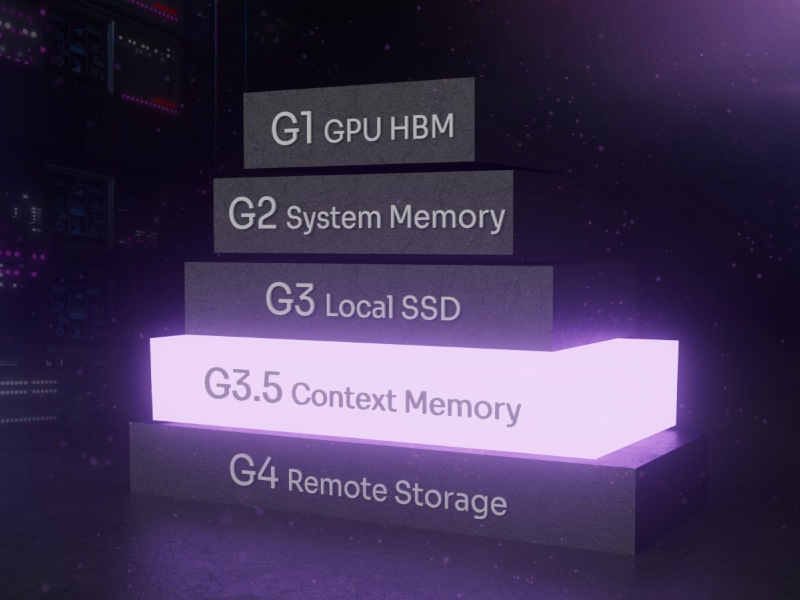
AI factories commonly use a tiered model for storage and memory.
This is where Solidigm becomes strategically relevant. As datasets grow, teams need to scale capacity and density without exploding power, rack footprint, and operational overhead. Read more about AI factory storage in our article: Understanding CMX (Context Memory eXtension) in Data Storage for AI.
A data center is the foundational facility that supports digital services. It exists to deliver reliable compute, storage, and networking with appropriate physical security, power conditioning, cooling, monitoring, and operations.
The IEA’s description is straightforward: Data centers house servers, storage systems, and networking equipment installed in racks, plus auxiliary infrastructure required to keep these systems operating.3
That general-purpose mission is why data centers excel at multi-tenancy workload diversity and have long-lived operational stability.
An data center provides the infrastructure and operational services required to train, fine-tune, deploy, and run AI models at scale. This ensures that compute, storage, networking, and governance work together so AI workloads can perform reliably, securely, and cost-effectively.
The core components of a data center are the IT systems and facility infrastructure required to run computing workloads reliably and securely at scale including compute, storage, networking, power, cooling, physical protection, and operational management.
Rack-mounted computers run continuously to process requests, host applications, store files, and run databases. May contain CPUs, Accelerators, Memory, and Storage.
Storage media hold data for all the processes carried out by the servers and are connected to compute servers when local storage is not enough. High-performance NVMe SSDs like the Solidigm D7-PS1010 are best for latency-sensitive reads and high-throughput needs. For data centers that need to maximize rack density and keep power usage to a minimum, the high-capacity Solidigm D5-P5336 NVMe SSD is a natural fit. Legacy storage options like HDDs and even tape can be used for cold storage. To learn more about storage options read our article: Legacy Is a Good Place for Disk Drives.
Connecting the servers to each other are switches, routers, Ethernet, and fiber optics cables. These also link the servers to the internet with high-bandwidth connections. Load balancers manage traffic to make sure requests are evenly distributed. This equipment is generally located at the top of rack location in data center design.
Data centers use a significant amount of power to keep everything running and it’s essential that this power remains uninterrupted. In fact, power is the single largest operational challenge for data centers. Utility feeds bring in power from substations for normal operations. But in order to make sure that data centers keep running, uninterrupted power supplies (UPS), which at small scale are essentially batteries that can keep the data center running in the event of a power outage, are a vital fallback. For longer term outages, diesel generators can provide additional power supply redundancy.
Cooling is the second biggest challenge for data centers. While, in essence, divided into liquid cooling and air cooling, there are numerous nuances to both of these approaches.
Air cooling: Most air-cooling systems use fans to push cool air through the servers and carry heat out into the room. Computer room air conditioners (CRACs) push cold air under raised floors, while in-row cooling units can be placed between servers. Above-row cooling eliminates the need for raised floors and draws hot air up while pushing cool air down into the racks. Air cooling today is best used for general purpose enterprise racks with moderate densities.
Liquid cooling: Direct Liquid Cooling (DLC) where a cold plate is attached to a device enclosure, or direct-to-chip cooling (DTC) where the cold plate is directly touching the silicon components, has become the default system that most people picture in a liquid cooling scenario. Immersion cooling, in-row liquid cooling, and rear-door heat exchangers (RDHx) are other options for liquid cooling in the data center.
Hybrid cooling: This approach blends liquid and air cooling when some racks are more dense or need more targeted cooling, such as when a portion of the environment is an AI pod. This can be represented by the GPU or CPU having a direct DTC liquid cooled solution, while fans are in the server to cool the memory and storage components.
Controlled access, surveillance, on-site monitoring protect valuable data and IP, infrastructure, and attacks from bad actors. It also is vital for regulatory and compliance requirements.
Early detection plus suppression systems must be aligned to facility risk standards. This can include the need for non-liquid-based fire retardants to ensure computer components are not exposed to electrical shorting hazards.
This includes features embedded into each of the components of the system to track wear, idle time, and other operational metrics. May include ongoing monitoring with Data Center Infrastructure Management (DCIM) software, observability tooling, alerting, incident response, and change management processes to ensure long-term viability and protection of investment in infrastructure.
A data center works by delivering continuous, protected power and cooling to IT equipment, then connecting that equipment through resilient networks and operating it with disciplined monitoring and procedures so applications run securely and reliably.
AI factories and traditional data centers share foundational infrastructure, but they diverge sharply in purpose, architecture, and operating metrics, especially once AI workloads become a primary driver of performance, cost, and scaling decisions.
In traditional environments, storage is often sized for capacity, resiliency, and cost.
In AI factories, storage frequently becomes:
NVIDIA’s sizing guidance emphasizes that NVMe local storage can remove bottlenecks and free GPUs to access data as fast as possible.1 This is a very “factory” way of thinking. NVMe storage exists to keep production moving.
Data center infrastructure is power hungry. That pushes decisions toward:
AI factories act like manufacturing:
As AI adoption grows, leadership conversations shift to unit economics:
This is where storage decisions can create measurable impact. If you reduce GPU idle time by avoiding I/O stalls, the same GPU fleet produces more output.
AI doesn’t just “add workloads.” It stresses facility and operational assumptions.
Grid capacity and local permitting increasingly determine where AI infrastructure can expand. Public reporting and forecasts repeatedly connect data center growth with rising electricity demand.
Higher per rack power needs, driven by GPU infrastructure and rack densities, force teams into:
In conventional environments, storage latency spikes are gating.
In AI training, storage stalls translate directly to GPU idle time. That’s why architectures increasingly emphasize NVMe tiers close to compute. To learn more, read our article: When AI Runs Out of Memory.
AI clusters are always communicating, with limited downtime. If east-west bandwidth is constrained, you get slower training, inconsistent inference latency, and operational complexity.
AI requires more stakeholder involvement than ever before—data science, platform engineering, security, legal, and product. Without an operating model (the “factory” idea), teams fall into endless handoffs and brittle one-off builds.
The AI factory vs data center distinction is not simply semantics; it comes down to a logistics and larger scale planning framework.
For enterprise leaders, the practical takeaway is that you can't treat AI like just another workload. If you do, you will likely exacerbate predictable data center issues such as power constraints, cooling limits, network connections, and storage bottlenecks that cause expensive GPUs idle time.
However, if you adopt an AI factory mindset, you can architect the pipeline so compute stays productive and NVMe storage becomes a strategic accelerant. This is where Solidigm high capacity SSDs and high-density tiers can create tangible operational leverage, scaling AI datasets and services without scaling complexity at the same rate.
Not exactly. An AI data center can simply be a facility running AI workloads, while an AI factory implies a production-style operating model optimized for end-to-end throughput and continuous iteration.
They’re used for RAG knowledge assistants, security analytics, personalization, industrial AI, and document automation: Anywhere AI models need to be trained, fine-tuned, or served close to enterprise data.
It typically has higher rack density, more east-west networking, stronger cooling requirements, and more performance-sensitive storage tiers so accelerators like GPUs and DPUs aren’t starved for data.
A data center conditions and distributes power, removes heat through cooling systems, connects systems via networks, and relies on operational processes to ensure reliability and security.
Storage throughput directly affects GPU utilization. If data can’t be delivered fast enough, accelerators sit idle, and AI costs rise; local NVMe is often used specifically to remove storage bottlenecks.
Power and cooling change first due to sustained accelerator use which generates heat. This is followed by network fabric for east-west (server-to-server or server-to-storage) bandwidth, and then storage architecture. GPU use depends on more NVMe tiers and higher-density SSD racks.
Power constraints, thermal hot spots, network oversubscription, storage bottlenecks, and organizational friction across teams are the most common failure modes.
Solidigm manufactures performance-based NVMe SSDs that provide customers a tailored product roadmap to enable AI factory scale. Offerings include liquid-cooled solutions and the world’s most consumed high-capacity drives, with NVMe SSDs at 122.88TB (and larger coming).
Start by mapping the AI lifecycle end-to-end (data ingestion → training → deployment), then design for throughput. Add NVMe tiers close to compute, standardize data governance and MLOps pipelines, and adopt unit economics metrics like cost per inference or cost per token.
Scott Shadley is Director of Leadership Narrative and Evangelist at Solidigm, where his focus is on efforts to drive adoption of new storage technologies, including computational storage, storage-based AI, and post-quantum cryptography. Scott brings over 25 years of experience in the semiconductor and storage space, where he has played a key role in both engineering and customer-focused roles.
Cecily Whiteside is Search and Content Manager at Solidigm. She writes for technology, lifestyle, and health & wellness websites and publications. Cecily has been managing editor at several magazines and contributed as a writer in others both in the US and abroad.
Subscribe for product updates, technical resources, and insights on accelerating AI workloads with Solidigm Storage